Showing posts with label TI-84 plus. Show all posts

Tuesday, January 14, 2014

TI-84 with CBR - how to turn off Auto Scale

I was recently asked, "How do you turn off 'Auto Scale' on a TI-84?" So I made a video to explain this. It also helps answer the question "how do you connect a CBR to your computer so that it will display on the TI-84 SmartView emulator?"
 YouTube video link
You may have noticed when you plug in a CBR2 using the mini-USB it automatically launches EasyData app. You can then just press ‘soft key’ for “Start” and a graph of the data shows up in real-time. However, if you are not moving, the auto scale makes it look like a jagged graph. This may be confusing to students. “If I wasn’t moving, why does my graph look like I was.” They may not realize that the y scale is only over a few millimeters, and this shows the amount of precision that the motion detector is able to account for as it determines the distance sound reflects off of a surface. “Attend to precision” is an important mathematical practice.
Not all of the modes do this auto-scaling. Distance Match does not auto scale. 


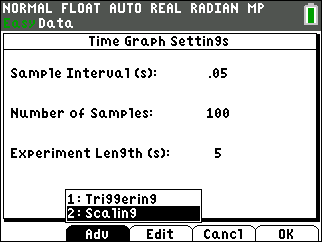
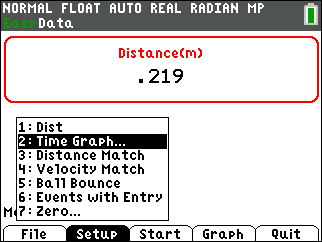
The scale can be changed after the data is collected, but the following demonstrates how to make it so that this is not necessary. Good news: Once this has been done, the setting will not need to be changed again for that TI-84. Press “Setup” and choose “2: Time Graph…”


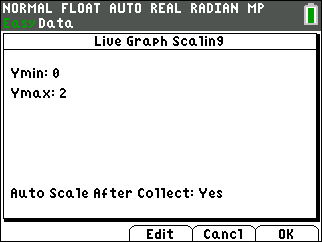
Choose “Adv” for the advanced settings. Then “Edit” to change the “Auto Scale After Collect” to “No.”

Tuesday, March 29, 2011

TI-Nspire Lab Cradle: Part 1

I just got back from a great T^3 STEM Conference in the Atlanta area. It was a blast* sharing "Colorful ConneXions" between math and science with the TI-Nspire CX CAS. (*Yes, I did show a video of the blast off of a recent Space Shuttle launch and gave links to NASA TI-Nspire activities, like this Alg 1 activity.) These CX sessions had an excellent mix of teachers and technology coordinators, including physics, physical science, calculus, and algebra instructors. One participant from Florida, who I hope to see at a Summer Workshop, wanted the session to keep on going because he enjoyed it so much.

Some of the participants were excited to learn about the new Vernier DataQuest application and wanted to know more about the TI-Nspire Lab Cradle, like how much it costs. For the participants who were familiar with Vernier's Logger Pro, they felt right at home with the DataQuest. They were pleased with the options available, like the built-in Motion Match, along with the versatility of the functionality.

Regarding connecting sensors, to use one CBR2 or an Easy Temp you do not need any interface device. Plug it in and you are ready to go and have students make discoveries and connections about slope, sinusoidal cures, parabolas and more. Two of my students won a trip for themselves and me to the Kennedy Space Center for their research and presentation regarding parabolas with the motion detector. (Here is the press release from last year.) Teachers will appreciate that you can just plug in the motion detector and click the green start collection button to get the position-time and corresponding velocity-time graph simultaneously.
Update: With OS 3.6 in December 2013, you don't need to move your cursor or press TAB to get to the green start collection button. It is active and ready for you to press Enter to begin collecting data. 

By pressing menu, Analyze, Tangent (derivative) or Integral, calculus classes will find themselves easily making real-world connections.

The Easy Link, an interface between one probe and the TI-Nspire handheld, enables you to plug into a good number of sensors. It costs $59. However, you are still limited to one sensor unless you plug into a computer. You can connect as many sensors as you have USB ports and Go! Links.

Data collection is extremely fast and easy when you do two sensors at the same time. Currently this can be done with the old TI-Nspire Navigator Cradle or with the software.
Now with the TI-Nspire Lab Cradle you can connect the mini-USB port on the top to the USB of your computer (no TI-Nspire handheld required) and enjoy demonstrating data collection with the 3 analog (for most sensors, including voltage, pressure, etc) and 2 digital (like for the CBR, microphone, rotary motion sensor, etc) channels.

Some examples of data collected with two sensors include: 

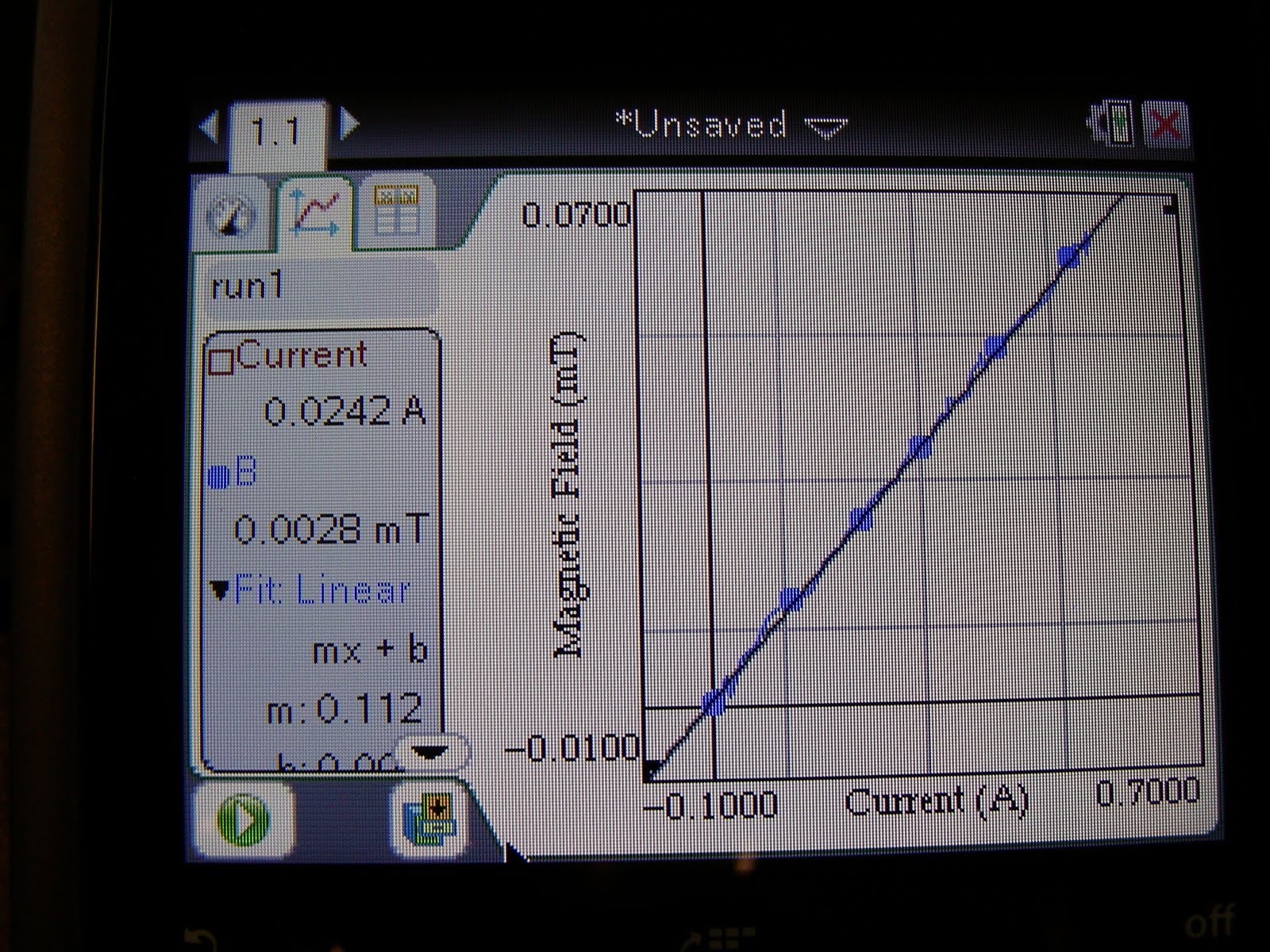
- Magnetic Field Sensor, current probe, and a slinky to get great linear data
- magnetic field sensor and motion sensor for distance for an inverse relationship
- light intensity and distance - an inverse square law relationship
- voltage and current - the slope of this linear data is resistance, based on Ohm's Law.

With the Lab Cradle you will even be able to plug in two CBRs if you have a mdc-btd cable. Students can then investigate motion parametrically. One motion detector can be oriented in the x-direction and the other in the y.

YES, you read that correctly. With the Lab Cradle you can use the old Vernier probes and sensors you've had in a science storage room or mathematics teacher's closet. This includes the CBR! I'll try to share more on this and include pictures this next week.

Also, the TI-Nspire Lab Cradle is like getting 3 Easy Links plus a lot of things you couldn't get or do with the Easy Link. So in that regards the $145 doesn't seem so bad. Especially if you got the 5-pack bundle that comes with a 5-unit charging bay, that would be enough for just about any class size. With the experiment set up, every student could collect the data on their own Nspire.

In a similar price range is Vernier's LabQuest Mini. It is $149. With that you will need a computer with Logger Pro or Logger Pro Lite. Of course with the Lab Cradle you need a TI-Nspire OR a computer with Nspire software (http://www.vernier.com/calc/ti-nspire/interfaces-and-sensors.html).
Vernier's stand alone device is LabQuest. This impressive colorful touchscreen device is $329, but it comes with the emulator software.

So if your school, or even if it is just you using the TI-Nspire Software, or if you have some students with the TI-Nspire, what should you get?

I'll try to answer this in more detail next time...
Monday, February 15, 2010

MathPrint on the TI-84

UPDATE 1/11/11: The release notes for the new TI-84 OS 2.55MP are now posted on a TI website. Also OS2.53MP info is posted there too. In case you didn't update in the past year, you can now enjoy 'wizards' for many of the statistics capabilities AND MathPrint. After trying out MathPrint, if you decide you really missed all the parentheses you got with square roots and the carat for exponents, or if you don't like the scrolling left/right lines as much as you enjoyed wrapping, you can always change modes to Classic. This way you will still enjoy the benefit of fraction math and scrolling history that the new operating systems give you.

It has been awhile since I've written a post here. It has been a busy year with teaching, family, and a big project. My wife has kept up recording the interesting family events.

For the first time in all my years of teaching, this semester I have a TA. Billy is a great teaching assistant. For the benefit of teachers and students who still use the TI-84 Plus (he and I enjoy the TI-Nspire CAS handheld and software) he has grabbed a bunch of screen shots for the new operating system using TI-Connect . Several wildly popular features that have been native to the TI-Nspire for the past 3 years, have now made their way on to the 84. On the TI-89 that I used to teach calculus with, there was what was referred to as "Pretty Print" on the output. You would enter an expression with weird syntax and many parentheses, but you could check that you entered what you wanted once you were finished.


The new operating system OS 2.53 MP [update: On January 10, 2011 OS2.55MP came out] brings the feature of MathPrint (TM) to the 84. Students will make fewer mistakes on homework and those important end-of-the-year exams, because what they enter looks like what is in the textbook or their homework paper. Students tend to enter calculations one step at a time and then they don't know where they went wrong. If they want to do a complicated calculation they would do well to enter it on their handheld technology - whether it be a TI-84 or Nspire - the way that it looks on their paper. Another new feature is, instead of pressing 2nd ENTER to review the last 10 entries, they can now arrow up around 30 entries. If they press enter on the selected number or calculation, this will be copied down so it can be edited or reused.The above screen shows some calculations that my students have done in the past. The first is to find the acceleration of a penny that is 18 cm from the center of a record that is spinning at 33 1/3 rpm. Notice that this is highlighted. If I press enter, then I could easily change it to be 45 rpm, or I could change it to a penny that is closer in (since vinyl albums actually have a radius a bit smaller than 18cm) . I love that the square root radically (pun intended) goes over everything that it is supposed to. The second calculation shows the amount of time it takes if I take that penny and drop it off the roof of our school 5.2 m above the ground. It is easy enough to change it and see how long it would take, ignoring air resistance, if this was dropped from the top of the Burj Dubai (828m), or we could change the 9.8m/s^2 to the acceleration of gravity on another planet.

Calculus teachers will particularly enjoy MathPrint because they won't need to spend the time teaching an unusual syntax like d(e^3x,x,5). Derivative at a point uses Leibniz's notation and the 'such that' vertical bar followed by the point for the derivative to be numerically evaluated. The definite integral is another example of MathPrint making the entering of a calculation more intuitive. Here are a series of screen shots that demonstrate an effective way to find the intersection, area between curves, and volume by rotation. Notice that MathPrint is supported in Y=.


Besides using the shortcut, of which there is a reminder every time the 84 is turned on, many of the features can be accessed through the MATH button, or MATH then NUM. If for some reason users preferred the classic view, there is now a second screen under MODE were MathPrint can be unselected. Also note that if mixed fractions are preferred they can be chosen. (Hey, fractions are now supported in the tables, lists, matrices, and window zoom.) I like that there is a central location for Stat Diagnostics to be turned on and another way to get to the Graph Screen Formatting.

All of the current apps (that I know of) are unaffected and still work except for Catalog Help. Be sure to download and install this using TI-Connect. The new OS 2.53MP is available under downloads at education.ti.com.

Teachers will want to put these on their TI-84 SmartView emulator so that what they do in front of the class matches what the students see. This is done by pressing File>Load File ... (as show on the left) then just find the OS (pay attention to where you save what you download). You don't want to throw away those silver cables. These come in handy for using the CBR with the 84 SmartView. However you won't need it to update the OS when using the TI-84 faceplate on the TI-Nspire. Updating the Nspire will automatically update the 84 mode.

These pleasant new features are not available on the TI-83. Again, to update the TI-Nspire that is in 84 mode, all you need to do is update the TI-Nspire (which leads us to believe that a new Nspire OS will be coming soon).

Stay tuned for all the impressive new features for the TI-Nspire & TI-Nspire CAS that make that device even more intuitive for new users. Current users will enjoy how their requests have been listened to in many ways. These educational tools really have continued to improve to meet the needs to teachers and students.


Lord, may how we teach and the tools we use
be filled with a beauty of design
that reflects the Creator of the universe
and the image of Him in whom we've been made (Gen 5:1).

May we use technology more effectively for the improved education of students.