Showing posts with label data collection. Show all posts

Tuesday, January 14, 2014

TI-84 with CBR - how to turn off Auto Scale

I was recently asked, "How do you turn off 'Auto Scale' on a TI-84?" So I made a video to explain this. It also helps answer the question "how do you connect a CBR to your computer so that it will display on the TI-84 SmartView emulator?"
 YouTube video link
You may have noticed when you plug in a CBR2 using the mini-USB it automatically launches EasyData app. You can then just press ‘soft key’ for “Start” and a graph of the data shows up in real-time. However, if you are not moving, the auto scale makes it look like a jagged graph. This may be confusing to students. “If I wasn’t moving, why does my graph look like I was.” They may not realize that the y scale is only over a few millimeters, and this shows the amount of precision that the motion detector is able to account for as it determines the distance sound reflects off of a surface. “Attend to precision” is an important mathematical practice.
Not all of the modes do this auto-scaling. Distance Match does not auto scale. 
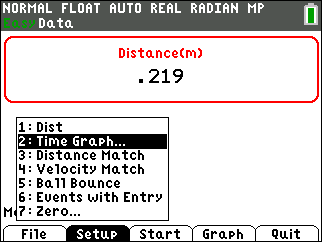

The scale can be changed after the data is collected, but the following demonstrates how to make it so that this is not necessary. Good news: Once this has been done, the setting will not need to be changed again for that TI-84. Press “Setup” and choose “2: Time Graph…”
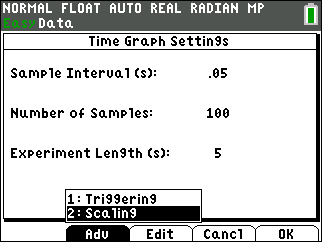
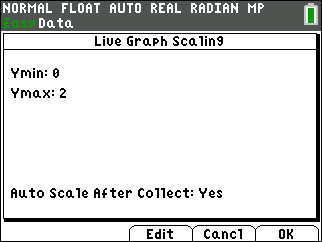

Choose “Adv” for the advanced settings. Then “Edit” to change the “Auto Scale After Collect” to “No.”

Friday, May 10, 2013

Polarization lab

During the 4th quarter project, I have had students rig up a rotational motion sensor and a set of polarizing films with the light intensity sensor resting on the bottom polarizer. When the intensity of light is graphed with respect to the angle, the Law of Malus is confirmed.

This is an innovative use of the rotary motion sensor, that is able to be used with the TI-Nspire shown by using a Lab Cradle. This could also be done by using the USB cord and plugging the TI-Lab Cradle into a computer that has the TI-Nspire software.
A rubber band is connected to the Vernier rotary motion sensor a the cut plastic water bottle as shown below. The portion of the water bottle rests nicely on a ring stand.
An incandescent lamp or flashlight above the top polarizer was used in a darkened room.

Friday, November 4, 2011

Pressure Sensor - Work

The students are doing a lab to better understand the relationship of pressure and volume, also known as Boyle's Law. They will also find work by using the Vernier DataQuest application on the TI-Nspire.

The following video shows the set up and the experiment. A screen shot showing the analysis done to find work follows.


To find the work, the area under the P-V diagram, use menu Analyze, Integral. It is important that the work is negative. Why is it negative?